EMBER-Vault: Account Setup
COMING SOON! This documentation is meant to give a sense of capabilities
EMBER-Vault is in active development and is currently undergoing beta testing with a small subset of users. If you are interested in testing EMBER-Vault in this phase or have any current needs for sensitive human data storage, please contact us at help@emberarchive.org."
EMBER-Vault is the subsystem of the EMBER archive designed to store and control access to sensitive human data, including human health data and identifiable human data. It is suitable for human neural and behavioral experiments with sensitive data, and is not appropriate for open data release or animal data. It is compliant and aligned with relevant standards for PHI/PII data storage.
For more in-depth information on the recommended data standardization workflow, see the guide on data standardization.
This resource is under active development, and we anticipate EMBER-Vault will be available soon!
Globus Account Setup
Pre-requisite
You will need to have an active Globus account, which can usually be obtained through your academic institution.
- Request access to EMBER-Vault by contacting EMBER admins. You will be asked to provide information and reasoning as to why you need an EMBER-Vault account which will be used to determine your eligibility
- If and when your account is approved, EMBER admins will contact you providing your EMBER-Vault username and temporary password as well as the name of your EMBER-Vault project collection
- Log in to Globus. This can be done through your institution's authentication method
- Navigate to your EMBER-Vault project collection
- Select File Manager
- Type in Collection name
- Select Collection
- Follow the steps to link your Globus and EMBER-Vault accounts.
- Once you have authenticated with EMBER-Vault and linked your accounts, you will be routed back to File Manager and see the following:
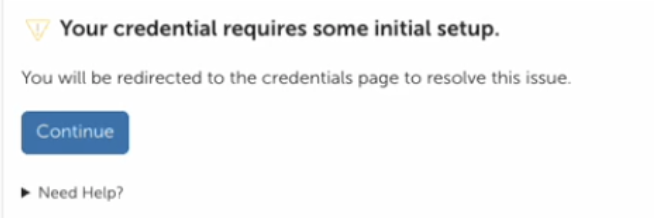
- Do not press continue
- Respond to your EMBER-Vault onboarding email to let EMBER admins know so they can connect your user to the data store
- Once you receive confirmation from EMBER admins to continue, sign back in to Globus and EMBER-Vault navigating to your EMBER-Vault project collection. You should now have full access and be able to download/upload data as your permissions allow